How to create EDMS documents with restricted access
By default, all documents created in the EDMS Documents tab are accessible by all identified EDMS users. If you would need to store confidential documents, this can easily be done by using an alternative EDMS Context. An EDMS Context has standard rules already preset that allow you to configure the same access rights for any document that has that specific context. For more details about your available EDMS Contexts and assistance to create a new one, please contact your local EDMS administrator. The list of local EDMS administrators can be found on the EDMS Portal page (https://edms.cern.ch) under the “Information” menu by clicking on “Local administrators”.
By default all documents created from within Infor EAM are associated with the EDMS Context “CMMS General”, which provides a very public set of access rights, allowing most CERN Users to view your documents. If you would like to use another Context (meaning different access rights etc), you simply select another in the corresponding field in the Document creation window. Please note that the available Contexts depend on your privileges in EDMS that are managed by your local EDMS administrator.
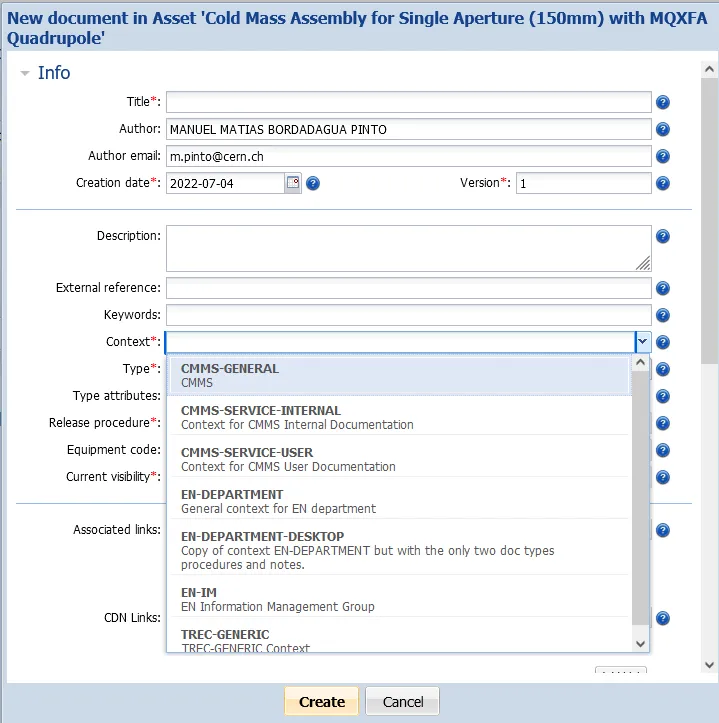
Note that a Service Unit in EAM can be linked to an EDMS Context, making sure that when you create a document for it, it will have this EDMS Context as its default instead.