Services
The CMMS Team at CERN provides the Organization with Asset and Maintenance Management capabilities, including both a set of IT tools as well as support, methodology and training in order to allow groups and projects to efficiently use these tools.
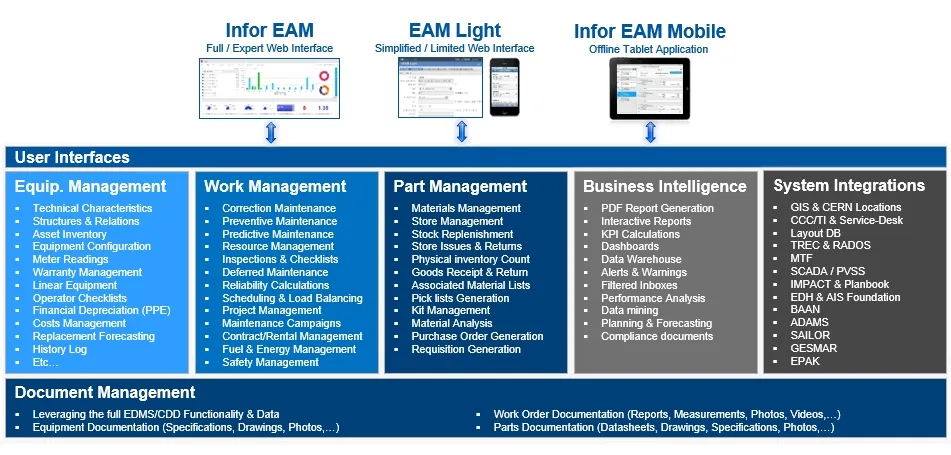
The main foundation for all Asset and Maintenance Management at CERN is Infor EAM. Infor EAM is a full-scale system for asset tracking and maintenance management which provides a wide range of functionality. Thanks to its different modules it is possible to start simple and become more advanced over time. The most frequently used modules at CERN include:
- Asset Management — recording data about equipment and property including specifications, warranty information, service contracts, spare parts, purchase date, and expected lifetime.
- Work Orders — scheduling jobs, assigning personnel, reserving materials as well as recording detailed technical work logs and costs.
- Preventive Maintenance — keeping track of preventive maintenance inspections and jobs, including step-by-step instructions or checklists, lists of materials required, and other pertinent details.
- Inventory Control — management of spare parts, tools, and other materials including the reservation of materials.
- Materials Management — monitoring and controlling inventory to prevent downtime and optimize use of monetary resources.
- Reports — working with predefined reports as well as customized reports to gain asset performance management insight.
- Scorecards /Key Performance Indicators — displaying dashboard-like gauges that indicate how assets are performing compared to user-defined benchmarks.
MTF is based on Infor EAM
All equipment information captured with MTF is physically stored and accessible in Infor EAM. This means that all components and assemblies registered with MTF can without any additional effort be directly accessed in Infor EAM in order to benefit from its full maintenance management capabilities.
Are you an MTF user that would like to use Infor EAM for maintaining your equipment?
Please contact CMMS.Support@cern.ch for some help in order to get started!