Category: Q A
-
How to use split view in EAM
How to use split view in EAM EAM allows to view a list and one record in a mode called split view. The view modes can be toggled by the means of the following menu buttons: To know more information about this, please consult the document Tips & Tricks n27 – Split View.
-
How to register ownership information in EAM or EAM Light
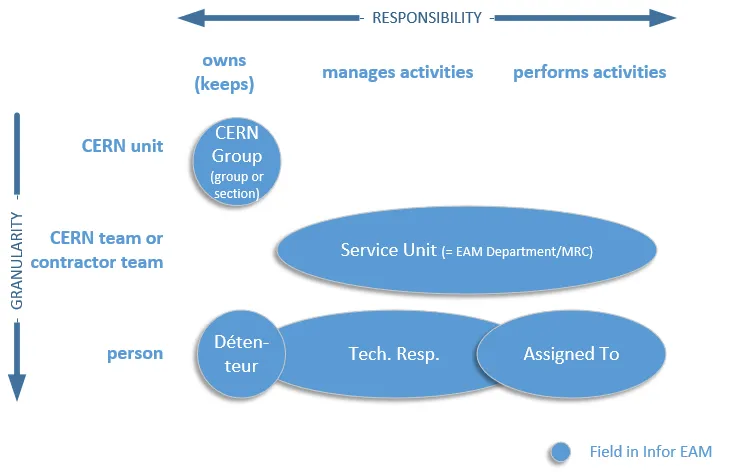
How to register ownership information in EAM or EAM Light Depending on the type of responsibility and the granularity, the ownership information can be registered by the means of the fields CERN Group, Service Unit, Technical Responsible, Assigned To and Détenteur. The image below allows to visulaize better these relationships. For more information, please consult
-
What do the Navigation buttons do in the EAM menu (buttons with arrows)
What do the Navigation buttons do in the EAM menu (buttons with arrows) There are several buttons with arrow symbols in the EAM menu bar. This is what they do: For more information regarding the navigation buttons, please consult the document Tips & Tricks Navigation Buttons.
-
How to check Who and When changed Data of a Record
How to check Who and When changed Data of a Record Important fields in EAM are udited, which means that each modification is recorded with a timestamp. You can view the audit in EAM either by right click on the record by selection the Audit option or by navigation to the Audit tab. For more
-
How to register Equipment Warranties in EAM
How to register Equipment Warranties in EAM In EAM, equipment warranty information can be registered on the Warranties tab. For keeping track of a standard 2-year warranty, select the warranty record CERN-2YR. The fields Duration and Start Date get automatically populated, but can be modified before saving the record. Once registered the user will be
-
What are Status code and System Status Columns in EAM
What are Status code and System Status Columns in EAM The regular status columns in EAM and EAM-Light display the status code concatenated with the status description. If you would like to filter work orders more easily by status code, add the column Status Code to the concerned dataspy. For equipment, there is a similar
-
How to sort Equipment or Work Order Lists
How to sort Equipment or Work Order Lists Sorting conditions can be added to your personal dataspies via the EAM interface. You can create a personal dataspy by cloning any one of the pre-configures dataspies available in your dataspy dropdown using the edit button. Nota bene: A pitfall of sorting work orders is the fact
-
What are some of the Keyboard Shortcuts for the menu in EAM
What are some of the Keyboard Shortcuts for the menu in EAM Some, but not all keyboard shortcuts are displayed in EAM by hovering over the menu icon. The most common shortcuts are: CTRL+N or F6 – new record CTRL+S or F10 – save record CTRL+D or CTRL+F6 – delete record CTRL+UP and CTRL+DOWN –
-
How to search for Values in Custom Fields
How to search for Values in Custom Fields A quick method to search for values in custom fields is by the screen "Search in Custom Fields". This screen allows to search in specific custom fields , but also allows to search for a value in all custom fields. Please contact support in case the screen
-
What is the Screen Cache in EAM
What is the Screen Cache in EAM The Screen Cache is a menu bar at the bottom of your screen to which you can add the most frequently used screens. The content of these screens is cached so that you can navigate between records on different screens easily. Screens are added to this menu by